Metadata#
Creating Metadata#
Creating a metadata table manually or using scripts is the first step in loading a dataset. This
is a TSV table. You can create it using the exprmat.metadata class and save it as a
TSV file, or you can create it by other means or manually. The table has at least six columns with
fixed column names, as follows:
- location: Specifies the location of the raw dataset.
This can be a folder or a file. The format specification is determined by the modality column. A specific modality can accept several supported file formats. See the table below for the supported range:
Acceptable file types for each modality# Modality
Acceptable formats as locations
rna
A folder containing three files: matrix.mtx(.gz), barcodes.tsv(.gz) and features.tsv(.gz) (the legacy 10X format of genes.tsv is also supported.)
A `.h5ad` or `.h5` file. If the file have variable names starting with rna: prefix, it is considered as reuseable processed files by the exprmat pipeline. It is thus expected that the obs table should contain the columns sample, modality, batch, gene, taxa. Any missing columns will lead to an error. If not starting with rna:, it is considered as files from other pipelines e.g. 10X standard H5 files, and the obs columns will be overwritten by the ones given in the metadata table (even if there is already in the H5 file). Variable names will be normalized to rna: automatically.
A `.csv` or `.tsv` file. Rows are genes and columns are cells. This will be transposed automatically, so do not edit yourself.
rna/splicing
A `.loom` file from the standard velocyto pipeline.
A folder, containing barcodes.tsv.gz, features.tsv.gz, spanning.mtx.gz, spliced.mtx.gz and unspliced.mtx.gz. These typically from separate feature counting pipelines or from BGI’s DNBC4 tools
rna/tcr
A `.csv` file from 10X’s standard CellRanger pipelines: filtered_contig_annotations.csv.
rna/bcr
A `.csv` file from 10X’s standard CellRanger pipelines: filtered_contig_annotations.csv.
rna/raw
A folder containing 10X compatible matrix market files
A 10X compatible .h5 file
atac
A `.tsv.gz` file containing mapped fragments. The genomic reference is automatically determined by taxa. This results in the use of latest genome reference by default, only can be configured manually to use user-defined versions.
atac-bulk
A `.bam` file for sequence alignment of ATAC-seq. This is recommended and have supports more functionality then input of a .bigwig.
A `.bigwig` file containing the summerized bins
cite
A folder containing 10X compatible matrix market files
A 10X compatible .h5 file. Such files contains 10X feature types other than RNA. This will be splitted to one rna modality and one cite modality after loading
xenium/c
A folder containing cells.zarr.zip, and cell_feature_matrix.zarr.zip to load segmented Xenium output from XOB analysis
xenium/s
A folder containing morphology_focus, and transcripts.zarr.zip for raw spot level Xenium data
visium
Visium v1 output folder with spatial, and filtered feature barcode matrix
hd/c
Cell segmented Visium HD data which contains segmented_outputs and barcode_mappings.parquet
hd/2, hd/8, hd/16
Bin level Visium HD data which contains square_xxxum and barcode_mappings.parquet
mif
A `.tiff` file with channelnames.txt under the same directory for multiplex IF or CODEX data
modality: Specifies the modality type of the data sample. See the table above.
- sample: Specifies the name of the sample.
Sample names must be unique within each independent modality but can be repeated across different independent modalities. Samples of dependent modalities must find their parent sample with the same name in an independent modality.
Important
What you set in the metadata table is not always equal to what the program actually maintained after experiment loading. The user input modalities contains several root classes and subsequent modifiers separated by a slash. (called sub-modalities). Submodalities inform the program to load with an special routine. After loading, the program will uniform such distinct submodalities into unified modality that have registered functions and accessors. The unified modality names are rna, atac, cite, spatial-cell, spatial-bin. Though the rna and atac may seems to be copies from the input modality (actually not), the latter three may appear to be completely re-organized and generated by the loader. As you can see, when user have an input modality cite, the program actually splits the dataset into one rna and one cite. The spatial- modalities are not acceptable as user input, users should specify distince technique names and the loader will decide which spatial modality to use. The final modality cannot contain duplicate sample names. For example, since xenium/c and mif both results in spatial-cell modality, it is not acceptable to input the same sample name for these two.
batch: Specifies the batch of the sample, used for batch integration and correction.
group: Free-form content, generally used to store experimental group conditions.
- taxa: The species name of the sample.
For RNA data, we look up the species gene list from the built-in database using the species name. For ATAC data, we find the latest reference genome based on the species name. By default, the installed database only contains the
hsaandmmuspecies. You can build or download databases for other species of interest yourself.
 1import exprmat as em
 2
 3meta = em.metadata(
 4    locations    = [
 5        # one sample from over-expression group.
 6        './oe1/filtered',
 7        './oe1/velocyto/splicing.loom',
 8        # one sample from wild type group.
 9        './wt1/filtered',
10        './wt1/velocyto/splicing.loom',
11    ],
12    modality     = ['rna', 'rna.splicing', 'rna', 'rna.splicing'],
13    default_taxa = ['mmu'] * 4,
14    batches      = ['b1', 'b1', 'b2', 'b2'],
15    names        = ['oe', 'oe', 'wt', 'wt'],
16    groups       = [
17        'somatic(cond(cd8, oe(A)))',
18        'somatic(cond(cd8, oe(A)))',
19        'somatic(wt)',
20        'somatic(wt)'
21    ]
22)
Note
Due to backward compatibility, the parameter names in the exprmat.metadata
constructor do not exactly match the TSV column names. For example, the default_taxa
parameter corresponds to the taxa column, and the names parameter corresponds to the
sample column. If you decide to write the metadata table manually, use the column names
specified in the example table below.
Finally, you should call exprmat.metadata.save() to save it as a TSV file on disk.
1meta.save('metadata.tsv')
This will be saved as a TSV file:
location |
sample |
batch |
group |
modality |
taxa |
|---|---|---|---|---|---|
./oe1/filtered |
oe |
b1 |
somatic(cond(cd8, oe(A))) |
rna |
mmu |
./oe1/velocyto/splicing.loom |
oe |
b1 |
somatic(cond(cd8, oe(A))) |
rna.splicing |
mmu |
./wt1/filtered |
wt |
b2 |
somatic(wt) |
rna |
mmu |
./wt1/velocyto/splicing.loom |
wt |
b2 |
somatic(wt) |
rna.splicing |
mmu |
metadata Reference
You can provide information for the six required columns in the constructor and use
define_column() to define new custom data columns. You can manipulate this table
object directly via metadata.dataframe. This class is a simple wrapper around a
Pandas DataFrame. Nevertheless, we recommend following certain naming conventions to make the
built-in methods easier to understand.
- class exprmat.metadata(locations, modality, default_taxa, names=None, batches=None, groups=None, df=None)#
Metadata at sample level. This class is a wrapper around sample level metadata table in pandas format, and can be dumped and loaded using plain text tables.
- Parameters:
locations (list[str]) – File system paths indicating directories where the data files locate. The protocols and procedures on how to load the dump files in the directory is determined by modality and what this location points to. For example, when modality is rna, the program will search for 10X-compatible mtx and tsv files if a folder is provided, or h5ad/h5 files if files are specified directly.
modality (list[str]) – What modality is in the location. Supported values are: - rna (Single cell RNA-seq), - rna.splicing (Supplementary spliced/unspliced counts in loom or mtx) - rna.tcr (10X 5’ TCR annotations), - atac (Single cell ATAC-seq)
default_taxa (list[str]) – The reference taxa of the sample.
names (list[str] | None) – Sample names in the loaded experiment. If left to None, names of the folder will be used. Since the folder names may duplicate, this is not forced to be unique. This might introduce some unexpected settings, so you are recommended to set this parameter explicitly.
batches (list[str] | None) – Batch information, if not set, this column is set to uniform value ‘.’.
groups (list[str] | None) – Experimental groupings, if not set, this column is set to uniform value ‘.’.
Notes
The inner metadata table follows several naming conventions. That auto-generated tables must have column
locationandsamplefor locations and sample names, andbatchandgroupcolumns for batches and experimental groupings, andmodalityfor library modality,taxafor default taxa where no prefix in features is specified. other metadata information is not necessary, and can be appended as specified by user, but do not set duplicate column names as these six.You may load a TSV table as metadata using
load_metadata().- define_column(name, default)#
Create a new column in the metadata table with given column name. And fill the column with the default value. The values can be further defined using conditions of finer scope. We recommend indicating all conditions with the carefully named sample names, and use simple conditional filters to process the sample names.
It should be noted that the column names should not be duplicated with the pre-defined ones: one of
location,modality,sample,batch,taxaandgroup, unless you are sure about what you are doing.
- save(fpath)#
Write the metadata object into a disk table file.
- set_fraction(key='sample', dest='group', sep='.', fraction=0, fallback='.')#
Alter the content of a column if starting with a string in the key column.
- Parameters:
key (str) – The key column to match the conditional pattern. This column must exist.
dest (str) – The column you may want to alter value according to the patterns in column
key, according to the conditions given.sep (str) – split the key column with specified separator, and picks out the certain fraction by sequential index to become the value of metadata.
fallback (str) – If the key column has bad format, what should be used to fill the metadata.
- set_if_contains(key='sample', dest='group', contains='.', value='.')#
Alter the content of a column if containing a string in the key column.
- Parameters:
key (str) – The key column to match the conditional pattern. This column must exist.
dest (str) – The column you may want to alter value according to the patterns in column
key, according to the conditions given.contains (str) – Test if values is contained in the
key. This requires that both variables be string.value (str) – If the condition is true, set the
destcolumn with this value.
- set_if_ends(key='sample', dest='group', ends='.', value='.')#
Alter the content of a column if ending with a string in the key column.
- Parameters:
key (str) – The key column to match the conditional pattern. This column must exist.
dest (str) – The column you may want to alter value according to the patterns in column
key, according to the conditions given.ends (str) – Test if values in the
keyends with this stringvalue (str) – If the condition is true, set the
destcolumn with this value.
- set_if_starts(key='sample', dest='group', starts='.', value='.')#
Alter the content of a column if starting with a string in the key column.
- Parameters:
key (str) – The key column to match the conditional pattern. This column must exist.
dest (str) – The column you may want to alter value according to the patterns in column
key, according to the conditions given.starts (str) – Test if values in the
keystarts with this stringvalue (str) – If the condition is true, set the
destcolumn with this value.
- set_paste(key1, key2, dest, sep=':')#
Paste the stringify values of two keys with separator
Reading Metadata from Disk#
You can read a TSV metadata table using exprmat.load_metadata().
Caution
If you choose to create the metadata table manually, please ensure your table is Tab-separated. The TSV table must have column headers and no row names. The column order can be rearranged, but the default order is generally recommended. Note that some editors automatically convert tabs to spaces without proper configuration. Make sure your tabs are actual tab characters. For example, in Visual Studio Code, you need to configure the following setting:
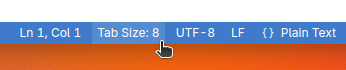
load_metadata Reference
Reads metadata from a saved TSV table. This function checks that the table contains the required columns as specified. Otherwise, it will raise an error.
- exprmat.load_metadata(fpath)#
Read the metadata table from disk.
Creating a Dataset from Metadata#
Once the metadata is ready, you have a guide that tells the package how and where to read each
sample’s data. You need to create a dataset based on this guide. The package will automatically
process and load each sample according to the specified types, creating an in-memory dataset.
See exprmat.experiment.